Fair comparison
A simpler Google Family Link alternative for child Android tablets.
Family Link is a serious Google account supervision tool. Nesty is different on purpose: it turns the child tablet into a simpler, visible routine with app lanes, KidTube, chores, rewards, quiet hours, and rules a child can actually see.
Short answer
If Family Link feels too abstract, Nesty makes the tablet rule visible.
If you are looking for a Google Family Link alternative for tablets, the real issue is usually not one missing button. It is that the parent is managing rules in one place while the child experiences the tablet somewhere else. Nesty is built around that gap. The parent dashboard controls the routine, and the child tablet shows the routine.
Family Link manages Google
It is official, free, and strong for Google accounts, Google Play, Chrome, Search, YouTube settings, screen time, and location on supported devices.
Nesty manages the child routine
It focuses on the actual child tablet: what opens now, what waits for reward time, which videos are approved, and which apps stay closed.
Simple beats hidden
A parent can explain three lanes more easily than a maze of invisible limits, exceptions, and settings spread across different Google screens.
Built by a parent
Nesty is a Snoaper product shaped around the daily parent problem: fewer arguments, clearer endings, and a calmer handover.
Where Family Link is strong
Family Link covers important Google controls, but the interface can feel spread out.
Google says Family Link can help parents understand device use, manage privacy settings, share location, and set digital ground rules. Its official pages describe daily time limits, Downtime and School Time schedules, app limits, Google Play approvals, Chrome and web restrictions, YouTube and Search controls, and account management.
That is valuable. It is also a lot for a tired parent to reason through when the only question is, "Can my child use this tablet now, and for what?" Nesty keeps that question closer to the surface.
Before switching
Work out whether Family Link is failing, missing, or simply hard to explain.
Parents often search for a Family Link alternative after a rule appears not to work. Sometimes Google's setup is misaligned. Sometimes the tablet has a manufacturer or Kids Space layer to understand. Sometimes the rule technically exists, but the child has no friendly way to see what it means.
Fix real mismatches first
If limits, downtime, or app approvals look wrong, compare the child account, signed-in device, schedule, network, time zone, and parent dashboard before changing tools.
Check the device layer
Android settings, Samsung Kids, Google Kids Space, system apps, and manufacturer updates can all change what the parent sees and what the child can do.
Make the rule child-readable
Family Link is strong for supervision. Nesty is useful when the child needs visible lanes, reward context, and a daily tablet screen that does not feel like a punishment wall.
Ask for help when setup drags
Nesty beta families can get live setup support so the tablet ends in a working, understandable state instead of a half-finished control stack.
Where Nesty fits
Nesty is for the child Android tablet routine.
Nesty focuses on what the child sees and what the tablet does during the family day: which apps are always available, which apps belong to chores or learning, which apps wait for reward time, which videos are available through KidTube, and when schedules should stop entertainment.
Why parents look for an alternative
Most parental-control pages sell more power. Nesty is trying to make the power easier to live with.
Competitors often lead with broad promises: monitoring, filters, location, app blocking, reports, alerts, and all-in-one control. Those features can matter. Nesty's narrower bet is that many parent-managed tablets fail in ordinary moments: bedtime, reward time, school apps, YouTube, and the child asking why something suddenly stopped.
Less dashboard hunting
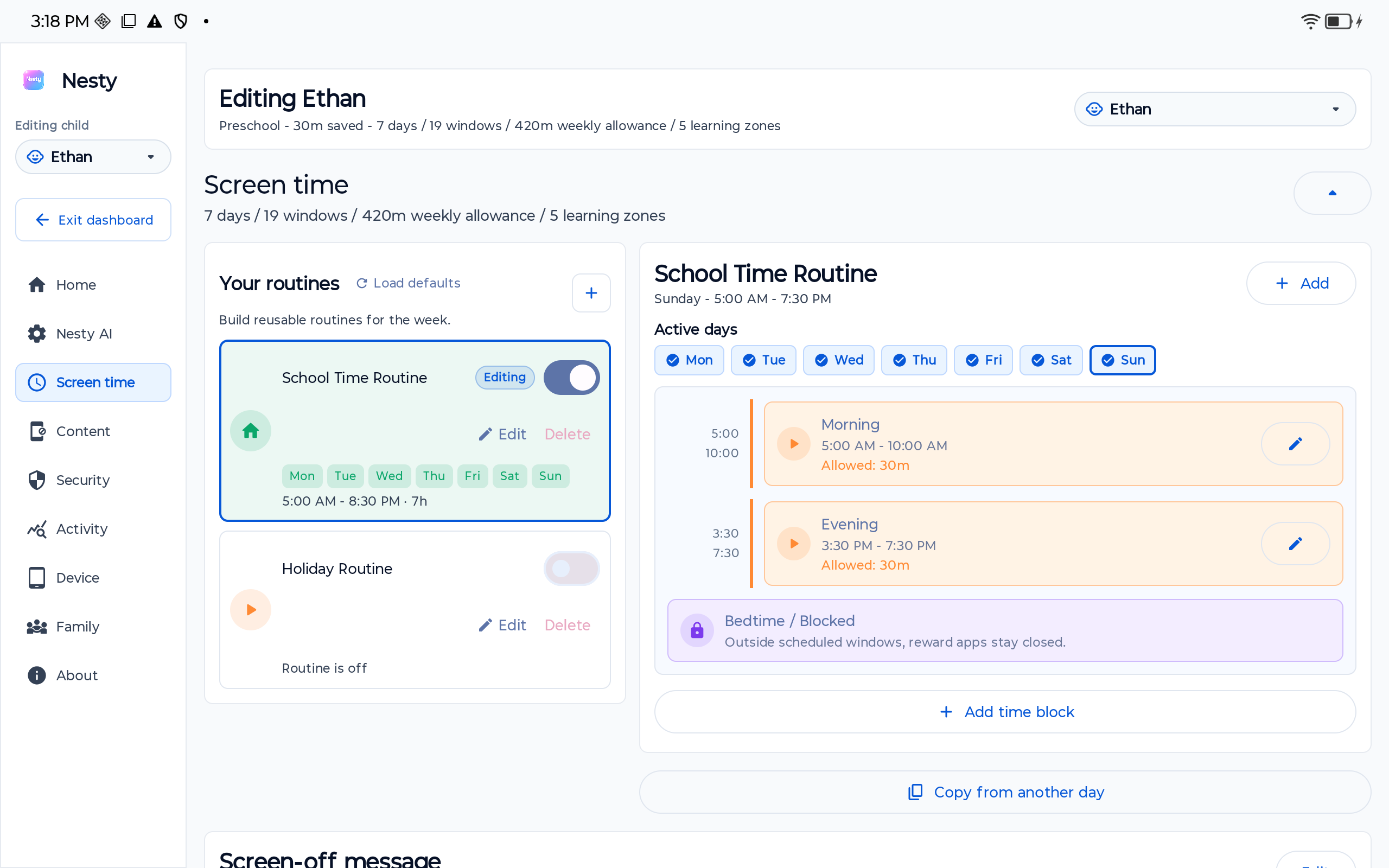
Parent controls are grouped around the child tablet routine: screen time, content, security, activity, device, and family setup.
Less guessing for kids
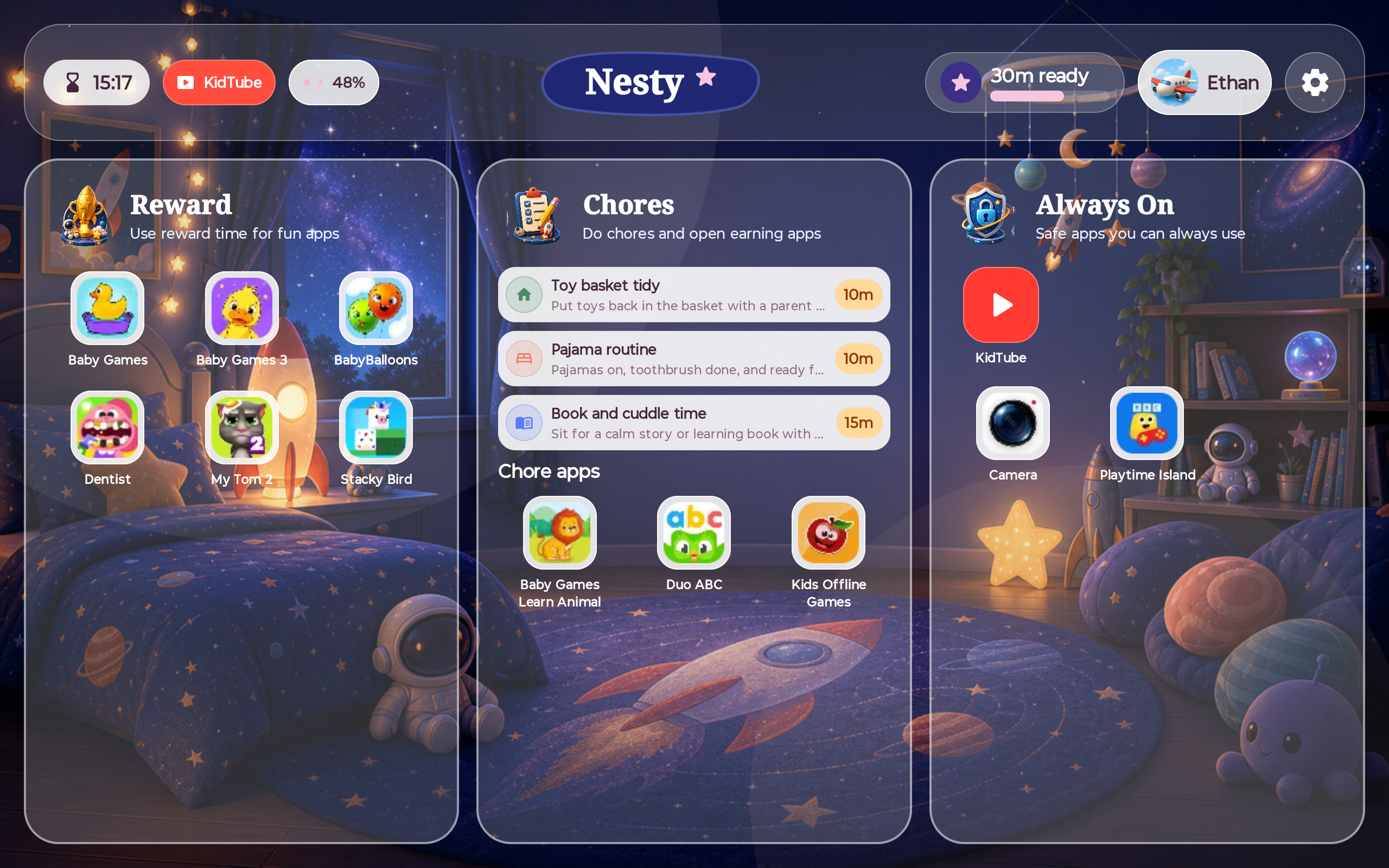
The child dashboard separates reward apps, chore apps, and always-on apps so the tablet explains more of the day by itself.
More parent choice
KidTube is controlled by parents. Nesty can suggest a starting point, but the final channel choices belong to the family.
Setup with a person
The beta route includes live support because a child tablet only helps when the parent leaves onboarding confident.
Side-by-side
For each Google strength, here is the simpler Nesty angle.
This is not a claim that Nesty replaces every Google feature. It is a practical guide to where Nesty can feel easier on a child Android tablet.
| Feature area | Google Family Link | Why parents choose Nesty as the simpler tablet layer |
|---|---|---|
| Google account supervision | Official fit for Google accounts, Google services, privacy settings, and supported device supervision. | Nesty does not try to be Google. It sits closer to the tablet routine so the parent can manage what the child actually sees and opens. |
| Daily limits and schedules | Supports daily limits, Downtime, School Time, bonus time, and lock or unlock on supported devices. | Nesty turns schedules into reusable routines and shows the child what is open, what is waiting, and why entertainment has ended. |
| App control | Can block, allow, limit, or mark apps as unlimited time where device support allows. | Nesty uses plain parent decisions: Always On, Chore, Reward, or Blocked. That makes the rule easier to review and easier to explain. |
| Google Play and web controls | Strong official controls for Google Play, Chrome, Search, and supported Google services. | Nesty keeps parent-approved apps and websites in the routine, while Play Store access can stay parent controlled rather than child-facing. |
| Video routine | Family Link includes YouTube and Google service controls where supported. | KidTube gives parents a more focused approved-channel path. Recommendations can help, but the parent decides what fits their child. |
| Child-facing clarity | Useful parent controls, but the child may experience them as hidden limits or sudden blocks. | Designed to show the rule on the tablet: reward apps, chore apps, always-on apps, remaining reward time, and blocked states. |
| Setup confidence | Families need to understand the Google account, device, app, and manufacturer layers. | Nesty beta testers can request live setup support so onboarding finishes with a working tablet rather than a confusing checklist. |
Decision checklist
Choose by the problem you are actually trying to solve.
Choose Family Link when your main problem is Google account management, Google Play approvals, daily screen-time limits, downtime, school-time schedules, app limits, Chrome website restrictions, location, or account privacy settings.
Choose Nesty when your main problem is the lived tablet routine: a child needs a simpler dashboard, clearer app lanes, visible chores and rewards, approved-video flow, quiet-hour rules, and a setup parents can test from the child's point of view.
Data integrity check
Before blaming either product, check the rule data.
When a child tablet behaves differently than expected, verify the right family, child profile, signed-in account, physical device, Android version, app lane, schedule, reward state, Family Link settings, and latest tablet payload. A stale child profile, wrong tablet, system app exception, or app in the wrong lane can look like a product failure.
Also check the parent dashboard and the child tablet together. If one says an app is reward-only and the other still shows it open, diagnose sync, schedule, and device state before changing the actual family rule.
Setup limits
No parental-control setup should be described as perfect.
Family Link and Nesty can both make tablet rules clearer, but neither removes the need for family judgement. Parents still need to choose age-appropriate apps and channels, review settings, update rules when routines change, and test devices after Android or app updates.
Nesty is focused on Android child tablets. It should not be treated as an iPad protected-mode product, a guarantee of safety, or a promise that every Android manufacturer behaves the same way.
FAQ
Google Family Link and Nesty questions.
Short answers for parents comparing Family Link with a child Android tablet control layer.
Is Nesty a replacement for Google Family Link?
Not for Google accounts. Family Link remains Google's official supervision layer. Nesty is an alternative child Android tablet experience for visible rules, app lanes, KidTube, chores, rewards, and routines.
Can I use Nesty and Family Link together?
Where the device setup supports it, yes. Many families can keep Google controls for the Google layer and use Nesty for the visible child tablet routine.
Which is better for a child Android tablet?
Family Link is better for Google account supervision. Nesty is better suited to child-facing tablet clarity, app lanes, KidTube, chores, rewards, and supported onboarding.
Does either app make a tablet perfectly safe?
No. Controls reduce risk and improve routines, but parents still need judgement, testing, reviews, and clear family rules.